Take control of your phone and block spam

Take control of your peace of mind and protect your personal space with these tools built into your device.

Recover Your Digital Peace and Say Goodbye to Interruptions!

Are you tired of your day being constantly interrupted by calls from unknown numbers who just want to sell you something? It’s time for you to take full control of your device and transform your mobile experience into something truly yours. Your phone is a door to a world of possibilities, and you have the power to decide who comes to your door. Don’t allow negativity or distractions to enter your sacred space. It’s your time to shine without interruptions!

These unwanted communications are not just a nuisance; They are an invasion of your privacy and your valuable time. But here’s the great news: you have everything you need to defend yourself right in the palm of your hand. Your Android device is packed with incredible features designed to empower you and give you the peace of mind you so deserve. Let’s take advantage of these tools together and turn your phone into a sanctuary of productivity and calm.

RelatedActivate the spam filter on Android and regain your peace of mind

Activate Your Blocking Super Powers

Imagine knowing who is calling you before you even swipe the screen. With Caller ID and Spam, you can do just that. This fantastic tool is like having a digital bodyguard who checks every incoming call. To activate this protective shield, simply open your Phone app, go to Settings and select “Caller ID and spam.” By activating this option, you not only protect your peace, but you also contribute to a safer community, helping to identify sources of nuisance for everyone.

What if you could create an absolute silence zone for unknown numbers? The Call Silencer is your best ally for this. This brilliant feature automatically blocks those unwanted calls, sending them straight to your history without them even ringing. Your focus and concentration are too valuable to be interrupted by a robot trying to sell you something! Activate it in the same “Caller ID and spam” settings by selecting “Filter spam calls.” Take a deep breath and enjoy the silence!

Your Contact List, Your Kingdom

The time has come to be relentless with those numbers that insist on bothering you. The block contacts feature gives you the ultimate power. Is a number harassing you? No problem! From your call history, long press the offending number and select the Block or “Add to blacklist” option. It is an act of self-love and setting healthy boundaries. Every number you block is a declaration that your well-being comes first.

By actively protecting yourself, you not only avoid scams and misleading sales, but you reaffirm your right to privacy. Each time you answer one of these calls, you confirm that your line is active, which can lead to more spam. By blocking and reporting, you break that cycle. Your peace of mind is invaluable! If you ever feel like a victim of fraud, remember that you can always contact the authorities, such as the Cyber ​​Police. Take action today, because a small step in protecting your digital space is a big leap towards a calmer, more empowered life.

It’s your turn to act! Share this power with your community on social networks and help more people regain their peace of mind. Do you want to continue transforming your digital experience? Explore more related content and discover all the ways your technology can work for you, not against you. The control is in your hands!
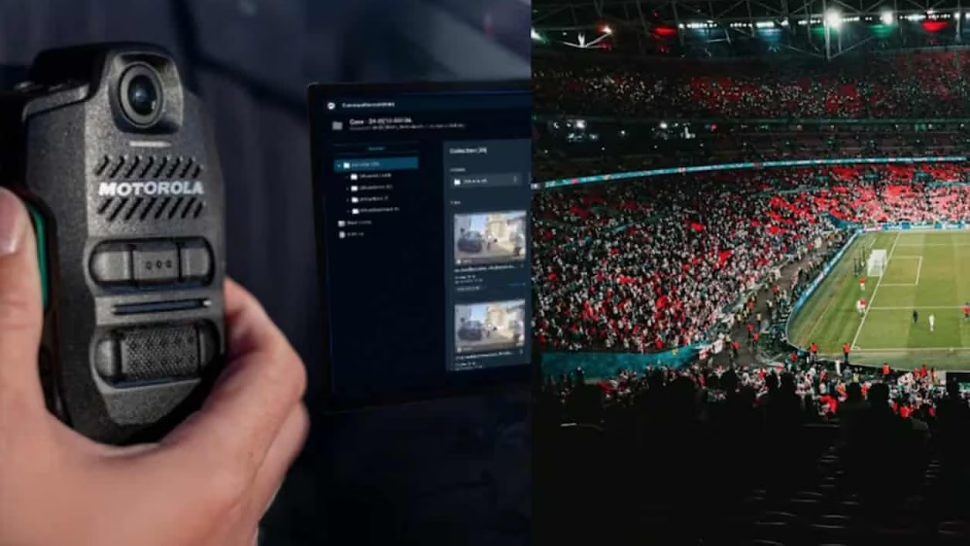

World Cup 2026: the technology that will transform how you watch football

Data, AI and 3D avatars will change the fan experience at the trinational tournament.

Almost 50 teams, three countries and more than one hundred matches. The 2026 World Cup will not only be the largest in history, but it will also transform the way we watch football from home. Artificial intelligence and advanced statistics will be the protagonists.

Tools like Football AI Pro, created with Lenovo, will help coaches prepare for matches and detect weak points. For the viewer, the data will be converted into graphs and summaries that explain what is happening on the court.

How the experience changes

In Qatar 2022, 12 cameras were already used to track the ball and 29 body points of each player 50 times per second. By 2026, that level of detail will be the norm. Stats will no longer be cold numbers: defensive lines, heat maps and movement patterns will be displayed.

In addition, the organization announced 3D avatars to recreate plays and referee decisions. Thus, tactical concepts such as high pressure or compact block will be visual and easy to understand.

The 2026 World Cup will maintain the excitement of goals and surprises, but with tools that allow us to better understand the game. Technology does not take away passion, but rather adds context.

Continue reading

Meta faces failures on Facebook, Instagram and WhatsApp

Users report intermittencies in Meta applications during the morning.

Failures in Meta services

Since this Wednesday morning, users of Facebook, Instagram, WhatsApp and Messenger reported interruptions in the operation of these platforms. The DownDetector site, which compiles crash reports, recorded an increase in complaints starting at 7:41 a.m.

According to the data, Facebook reached its peak of reports at 8:11 with 5,245 incidents. The main problems were concentrated in the application (47%), login (33%) and connection to the server (16%).

Messenger also had bugs. Its highest peak occurred at 7:48 with 260 reports. The most common difficulties were logging in (67%), the app (24%) and messaging (7%).

In the case of Instagram, reports increased until 8:20 with 326 complaints. 68% of users reported problems with the app, 14% with the connection to the server and another 14% with the login. The Tech Bit team confirmed difficulties when trying to publish stories, which could be related to the same bug.

WhatsApp, for its part, also suffered interruptions. 47% of the reports indicated problems with the web version, while 23% mentioned errors in the app and 16% in the login.

So far, Meta has not issued an official statement about the causes of these failures. Users are advised to stay tuned for updates.

Continue reading

Google integrates Gemini into Chrome for all of Latin America

Google expands its Gemini assistant in Chrome for users in the region.

Smart assistant comes to the browser

Google confirmed the expansion of Gemini, its assistant based on artificial intelligence, in Chrome for all of Latin America. Mexico is among the countries that already have access to this function, designed to simplify tasks within the search engine.

According to the company, Gemini helps users “understand information, stay organized, and complete tasks more easily.”

What does it allow you to do?

The integration eliminates the need to switch tabs to use the AI. In the upper right corner of Chrome the legend “Ask Gemini” appears.

With connections to Gmail, Maps, and Calendar, you can compose emails, check locations, and schedule meetings without leaving the current page. You can also compare products or summarize data from multiple open tabs. Google explains that “Gemini can understand the context between tabs and help you bring all the information together in one place.”

Additionally, Chrome incorporates AI-powered image editing tools, allowing you to transform photos directly from the browser with simple instructions.

Security and control

Google assures that these capabilities were “designed to always keep you in control” and developed with security as a priority. The models were trained to detect known threats, such as attempts to inject malicious instructions, in order to offer safer browsing.

The feature is now available for Chrome users in the region.

Continue reading